
Readers move between formats more easily than they once did.
A person may read on a Kindle at night, listen to an audiobook in the car the next morning, and return to print on the weekend without thinking much about the distinction. The question is no longer whether one format has replaced another. The better question is what each format does well, and which one makes the most sense for the way someone actually reads.
At Seaford Shores Publishing, we are interested in books, but also in the reading life around them. Format shapes experience. It affects pace, attention, memory, convenience, and even whether a book gets finished at all.
A Kindle-style e-reader offers one kind of reading experience. An audiobook offers another. Neither is automatically better. Each is better at something.
What an e-reader does well
An e-reader is often the stronger choice for readers who want control.
The text stays visible. Passages can be highlighted. Notes can be added. A quote can be found again without much trouble. That matters for readers who underline, revisit, compare, or study. It also matters for nonfiction readers, readers who like to keep track of themes, and people who simply remember better when they see words on the page.
E-readers also reduce certain kinds of friction. They are light, easy to carry, and easier on the eyes than a bright phone screen. For many readers, they make sustained reading simpler because they narrow attention to one task.
That kind of focus still has value.
What audio does well
Audiobooks solve a different problem.
They make reading possible when the eyes are busy and the hands are occupied. A person can listen while driving, folding laundry, walking, or cooking dinner. For some readers, audio turns otherwise lost time into reading time. That alone gives it enormous practical value.
A skilled narrator can also deepen a book. Tone, pacing, restraint, irony, weariness, warmth, and tension all register differently when heard aloud. Some novels gain force through performance. Some memoirs feel more intimate in the author’s own voice. Some books become easier to stay with because the narration carries the reader through difficult or dense stretches.
That is not a lesser form of reading. It is a different form of attention.
Retention is not always the same
This is where the difference becomes more noticeable.
Readers often retain information differently depending on how they take it in. Many people find it easier to remember details, structure, or exact phrasing when they have seen the words and can return to them. Visual memory has an anchor. The page, the paragraph, the highlighted line… all of that helps.
Audio can be immersive, but it can also drift if the listener is distracted. A missed sentence in print sits on the page. A missed sentence in audio is gone unless the listener stops and rewinds.
That does not make audiobooks weak. It simply means they may not be the best choice for every purpose.
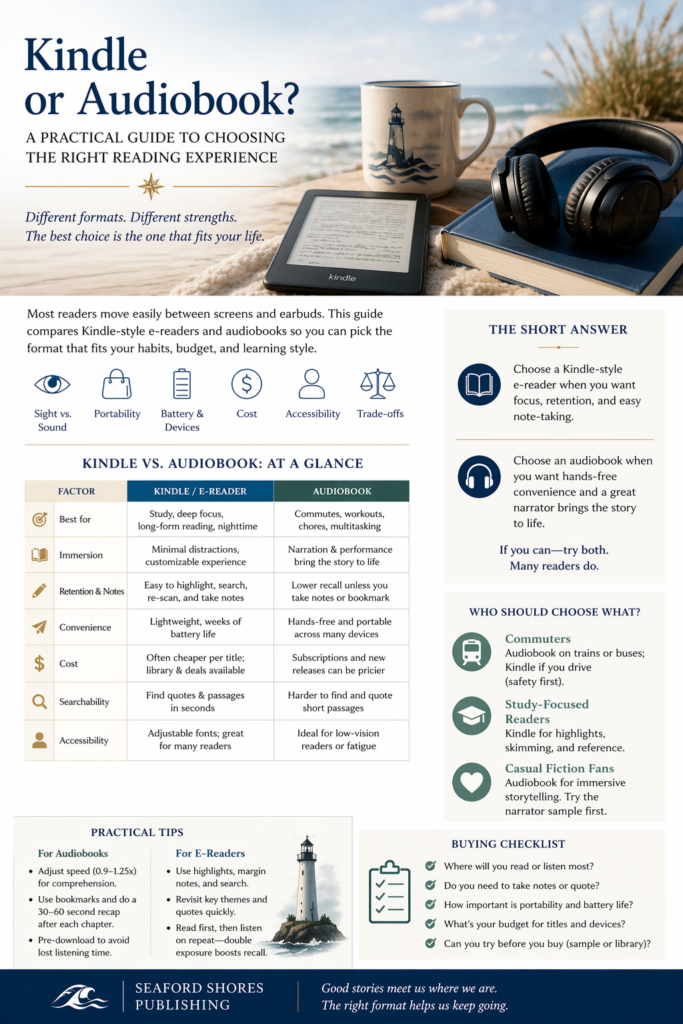
If the goal is study, reference, annotation, or careful rereading, the e-reader usually has the advantage.
If the goal is immersion, convenience, or making more room for books in a crowded life, audio often wins.
Practical questions matter too
Reading formats are not only about preference. They are also about logistics.
Battery life, portability, storage, note-taking, accessibility features, and cost all shape what works best for a given reader. E-readers tend to hold a charge for a long time and are built for one thing. Phones and tablets do more, but also demand more. Audiobooks require headphones, speakers, or a car connection, but they also free the reader from having to sit still.
Accessibility matters here as well. Some readers benefit from adjustable fonts, larger text, and screen contrast. Others benefit more from narration, playback speed controls, and the ability to listen rather than strain through text. For many, the right format is simply the one that makes reading more possible.
That is reason enough.
Cost has its own say
Format affects price too.
Ebooks are often cheaper than hardcover editions and frequently go on sale. Audiobooks can be more expensive when bought individually, though subscription models and library apps can help. For some readers, the choice is shaped less by ideology than by budget and availability.
That is a sensible way to make the decision.
A format should not need a grand theory behind it. It only needs to fit the reader’s habits well enough that the books continue getting read.
The most sensible answer may be both
Many readers will end up using both formats for different reasons.
An e-reader may be best for slower reading, note-taking, and concentration. Audio may be best for travel, routine tasks, or books that benefit from voice. Some readers move between the two with the same title. Others reserve each format for a different kind of book.
There is nothing inconsistent about that. It is simply practical.
At Seaford Shores Publishing, we are less interested in declaring a winner than in recognizing what helps a reader stay engaged. Books meet people in different circumstances. The right format is the one that makes the meeting easier.
For some, that will be an e-reader and a quiet chair.
For others, it will be a narrator in their ear while the rest of life continues around them.
Either way, the point is the same.
To keep reading.